Windows Vista celebrated its first birthday in January 2008, and while some people are still clinging to their Windows XP security blankets computers (or even Windows 98), many people have already made the jump to Windows Vista on their PC's. The good news for the fearful bunch out there is the Service Pack 1 is now available for Windows Vista. Service Packs are major updates Microsoft releases that includes all previous updates as well some underlying changes to the way Windows works. Installing Service Pack 1 is as simple as running Windows Update from your Control Panel. Microsoft will be rolling out the Service Pack based on the compatibility of the drivers it finds in your system. When all of the necessary components have been updated through Windows Update then it will present Service Pack 1 as an optional update. Installing the update may take up to an hour (and up to three restarts) depending on the speed of your system.
Friday, March 28, 2008
Windows Vista Service Pack 1 Now Available
Roxio versus Nero
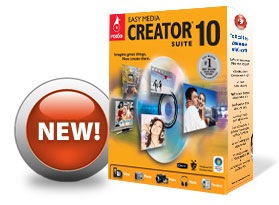
Two of the most popular consumer level DVD authoring programs are made by Roxio and Nero. Roxio's Easy Media Creator and Nero's Suite are both priced around $100 and provide about the same features. The goal of these products is to bring media management and creation to the desktop for the every day person. With these applications you can import video and pictures from your camera, edit them, and then make your own DVD's. While both products aim for simplicity they are in many ways complicated and buggy. In addition the bundled software take over your computer by making itself the default application for every media file type available. Fortunately Windows Vista Home Premium now comes with Windows Movie Maker and Windows DVD Maker which should be able to meet most of the needs of the everyday person. If you needed features beyond what Windows Vista can provide, I'd recommend going with Nero first.
Friday, July 27, 2007
Microsoft releases Windows Home Server to manufacturing - Engadget

Microsoft is hoping to fill an ever-increasing need in home networks or even small businesses by providing a whole new system called Microsoft Home Server. Microsoft Home Server, which will be available in the coming months through providers such as HP and others, will provide your home network with a central location for data storage and sharing. Windows Home Server also provides you remote access to your home network PC's and data. Look at your favorite PC retailer in the coming weeks for the Windows Home Server to meet your home storage needs.
Link to Microsoft releases Windows Home Server to manufacturing - Engadget
Featured Windows Download: Install missing codecs with CodecInstaller - Lifehacker
If you have ever downloaded a song or a video file from the Internet and just couldn't play it back on your Windows computer it may be because you didn't have the proper codecs installed. A codec is a piece of software that can enable your media player the media clip in whatever format it may have arrived in without trying to convert it to another format. You can use CodecInstaller (freeware) to install any missing codecs onto your computer to prevent that unplayable media problem from happening again.Link to Featured Windows Download: Install missing codecs with CodecInstaller - Lifehacker
Sunday, July 15, 2007
BetaNews | Microsoft Patches 7 Critical Vulnerabilities
Patch Tuesday came and went July 11th this week as Microsoft released ten new updates, seven of which are deemed critical. Be sure to install any available updates to your Windows systems. Windows XP and Windows Vista should be configured to update and install updates automatically on a daily basis. Check the Security Center in the Control Panel to ensure Windows Updates are scheduled to be installed. The default option for Windows XP and Windows Vista is Daily at 3:00 AM to download and install any updates. If your computer is on at 3:00 AM it will check for any new updates, download and install those updates, and restart the computer if necessary. If your computer is not on at 3:00 AM the computer should check for updates the next time it is powered on. You can manually check for in Windows XP by going to http://update.microsoft.com/ in Internet Explorer. Windows Vista handles Windows Update through the Control Panel. Click on Check for Updates in the Windows Update section of the Control Panel.
Link to BetaNews | Microsoft Patches 7 Critical Vulnerabilities
Link to Microsoft's Official Security Bulletin for July 2007
Friday, July 13, 2007
BetaNews | Apple Patches Eight QuickTime Flaws

Apple has released some updates to its QuickTime media player to address some security flaws. Both Windows and Mac users are affected by these vulnerabilities. Other updates to iTunes and QuickTime have been made available to add support for the iPhone and full screen video for free in QuickTime.
Mac users use Software Update in the Apple system menu.
Windows users click Start, All Programs, Apple Software Update.
Link to BetaNews | Apple Patches Eight QuickTime Flaws
Link to Ars Technica | Apple Updates iTunes and Quicktime; free full screen
Wednesday, June 13, 2007
BetaNews | Apple Bringing Safari to Windows

Apple forayed into the Windows web browser market announcing the immediate availability of their pre-release Safari web browser for Windows XP and Windows Vista. Steve Jobs announced the Safari browser for Windows during his keynote address at the World Wide Developer Conference. You can pick up your copy for Windows at Apple's website. Please note the software is beta (pre-release) and has already demonstrated some serious security issues.
Other web browsers available on Windows XP/Vista:
Wednesday, June 06, 2007
Apple fixes QuickTime Java vulnerabilities
Friday, May 04, 2007
Seven Security Bulletins for Patch Tuesday

Seven Security Bulletins for Patch Tuesday
Have your Windows Update shortcut ready for this coming Tuesday because Microsoft is issuing seven updates affecting Windows, Office, and various server software.
Wednesday, May 02, 2007
QuickTime 7.1.6 update fixes $10,000 QT bug

Apple issued a critical update for QuickTime media player on which iTunes is built. The security vulnerability affects both Windows and Mac computers. Be sure to fire up your Apple Software Update to get the fix to avoid any potential problems.
For Windows: Click Start, All Programs, Apple Software Update.
For Mac: Click the Apple Menu, Software Update...
Tuesday, April 17, 2007
Configure Windows XP to Automatically Login

Configure Windows XP to Automatically Login
Windows XP has a feature which automatically logs you on when your computer starts if you only have one account and no password on your system. Occasionally you'll find that Windows XP no longer logs you in automatically. Follow the above link to turn that feature back on.
Friday, December 08, 2006
So Many Versions of Windows Vista? How Do I Decide?
To make it simple you will typically be started off with Windows Vista Home Basic with a budget PC with the option to upgrade for a few dollars to Windows Vista Home Premium. The high-end multimedia and gaming PC's may come with the option to get Windows Vista Ultimate pre-installed. Most home users should do fine with Home Basic, but you might as well shell out the extra bucks to upgrade to Home Premium. The Business and Enterprise editions are specifically for corporate networks. If you run a SOHO business you should evaluate whether or not to upgrade to the Business edition, but most likely you will not need those functions for everyday business tasks.
Friday, December 01, 2006
Steve Ballmer Makes Microsoft's Biggest Announcement Since 1995
Read the official press release to see all of the product announcements.
Wednesday, November 22, 2006
Bugs in Every Computer
Updates, updates, updates: Be sure to keep your OS and software applications up to date.
Thursday, November 02, 2006
It’s official: Vista and Office 2007 to launch November 30
As promised by Microsoft, Windows Vista will be delivered in 2006 beginning on November 30 to corporate customers. The almost official date for consumer availability will be January 30, 2007. Microsoft's big announcement will also include the immediate availability for Microsoft Office 2007 and Microsoft Exchange 2007 on November 30th as well marking the first time Microsoft has released a new operating system and a new office suite (and email server) on the same day.